How to Use METS?
Overview
METS stands for Meritto Engagement and Transactional System is Meritto’s centralized credit management system. It streamlines how institutes manage communication credits across Email, SMS, WhatsApp, Niaa, and Mio AI channels Mio AI Guide, Mio AI Voice, and Mio AI Coach.
Key Benefits of METS
- Single recharge with flexible channel allocation
- Real-time transparency and the ability to reallocate unused credits
- Automated notifications when balances run low
- Export capabilities for offline reporting and analysis
Navigating the METS Dashboard
Total Available Balance (Top Card)
Split into:
- Allocated METs: Already assigned to channels.
- Unallocated METs: Free to assign anytime.
Channel-Specific Cards
Each card (Email, SMS, WhatsApp, Niaa, Mio AI Guide, Mio AI Coach, Mio AI Voice) shows:
- Quota Assigned: METs allocated to that channel.
Quota not defined: No credits assigned yet.

Notes:
- SMS (International) Click +1 to expand details.
- WhatsApp (Service/Utility/International) Click +5 to view template-level data.
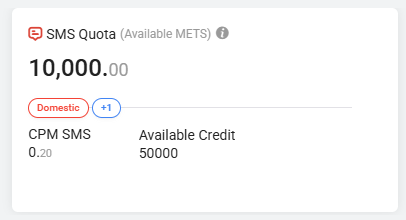
Available Credit
Displays how many messages/sessions can be sent using assigned METs, auto-calculated from current CPM/CPS rates.
How to Allocate METS?
Allocation is dynamic and can be done anytime.
Steps:
- Go to the Total Available METS section.
- Click on Allocate Quota.
- Select the channel.
- Enter the number of METS against a specific desired channel.
- Hit Save.
How to Remove Quota for METS?
Removal is dynamic and can be done anytime.
Steps:
- Go to the Total Available METS section.
- Click on Allocate Quota.
- For channel-specific, click on the cross icon against the respective channel.
- For all channels in one go, click on the Remove all quota icon.
- Hit the Remove all quota icon.
Changes reflect instantly across the dashboard.
Monitoring MET usage & activity
Ledger
- Complete transaction log of METS additions, reversals, and deductions.
- Helps with audit trails and financial tracking.
Usage Tab
- Breakdown of:
- Channel-wise METS consumption
- Message types (Transactional, Promotional, etc.)
- Template types (WABA Marketing, Utility & Service)
- CPM/CPS rates
- Total messages sent and sessions created
Logs
- Tracks all system operations:
- Credit updates
- CPM/CPS updates
- Quota update activities
Smart Alerts & Downloads
Real-Time alerts: Triggered when balances are low as per defined values.
Downloadable reports: Export the respective dataset with a single click.
Why You Might See a Temporary Negative Balance in Ledger
- Sometimes Ledger shows a negative balance for a moment, in the middle of a transaction.
- This is not an error, and it does not mean the institute owes anything.
- It happens because a single bulk action — for example, a bulk send where some messages fail — is recorded in two separate steps: first the full cost is deducted, and shortly after, the portion that didn't go through is credited back.
- Between those two steps, the balance can briefly dip below zero.
- Once both steps are recorded, the closing balance is correct after clubbing both.
- An institute has 100 METs available.
- A bulk send of 150 messages is triggered, and the system deducts the full cost upfront — 150 METs — since that is the total cost of the batch. This takes the balance to -50 METs.
- Shortly after, 60 of those 150 messages fail to deliver, so the system credits back 60 METs for the ones that didn't go through.
- Once this reversal is applied, the balance becomes -50 + 60 = 10 METs — exactly right, since the institute is only charged for the 90 messages that were actually delivered (100 - 90 = 10).
- The dip to -50 METs in between was never a real shortfall; it was simply the deduction posting before its matching reversal.
- In short: if you see a negative number in METs ledger right after a bulk action, wait for the reversal entry — it typically posts within moments — and check the closing balance. It will reconcile.
All existing credit in systems will be migrated based on the defined automated calculation to METs:
- Channel-specific credits, converted to METs using standard CPM/CPS.
- Negative balances adjusted.
- Unified system for better flexibility and visibility.