Smart Capture: Update Faster Work Smarter
Overview
Smart Capture is a context-driven form experience that helps teams capture and update important applicant information from one place.
A single form can capture Leads, Opportunities, Activities, and follow-up events, with fields that show, hide, become mandatory, auto-fill, or change values based on conditions set by the admin.
Logic conditioning ensures users only see the fields relevant to their context, so every applicant action gets recorded with the right information, without asking teams to fill in what doesn't apply

Best suited for:
Accounts where teams are the primary data entry point, interactions are frequent, and CRM data quality directly shapes the next conversation.
Why Does It Exist?
Counselors handle 40–80 student interactions a day. Every interaction needs to be recorded. Post-conversation updates are spread across modules, lead profile, opportunity stage, activity log, and follow-up calendar.
The more steps between an interaction and its record, the more context gets lost.
Smart Capture compresses that gap.
One form, opened once, updates everything at once. The lead stays current. The opportunity stays accurate. The quality of Education CRM data used by managers, counsellors, and reporting teams is always reliable.
How Does It Work?
Step 1: Admin builds the form
Drag and drop relevant fields from Lead, Opportunity, Dynamic Activity, and Calendar Pro into one configurable form. Or build multiple forms for each module or combination as per the use case.
Step 2: Rules are set
Conditional logic ensures counselors only see fields relevant to the current interaction, stage, or student type.
Step 3: Counselor fills one form
Post-interaction, they fill one Smart Capture, and the call outcome, opportunity update, and next follow-up gets updated, all at once.
Step 4: CRM updates everywhere
Every module reflects the update instantly. No switching. No repetition. The student record is always current.
How To Create A Smart Capture?
Step 1: Navigate to Smart Capture
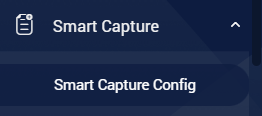
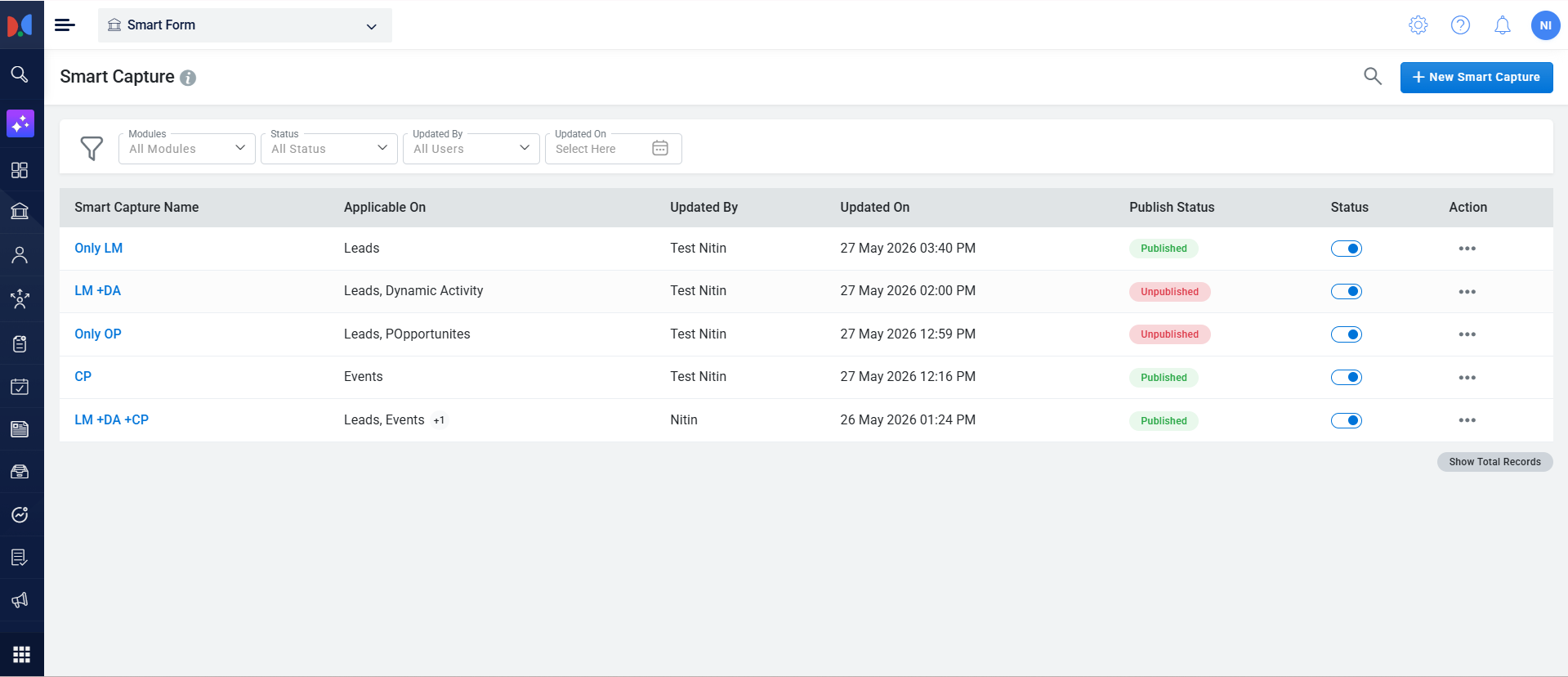
Click the menu icon icon and navigate to Smart Capture > Smart Capture Config. Click on the Smart Capture Config to open the Smart Capture page. Permission for the same must be enabled.
Step 2: Create a New Smart Capture
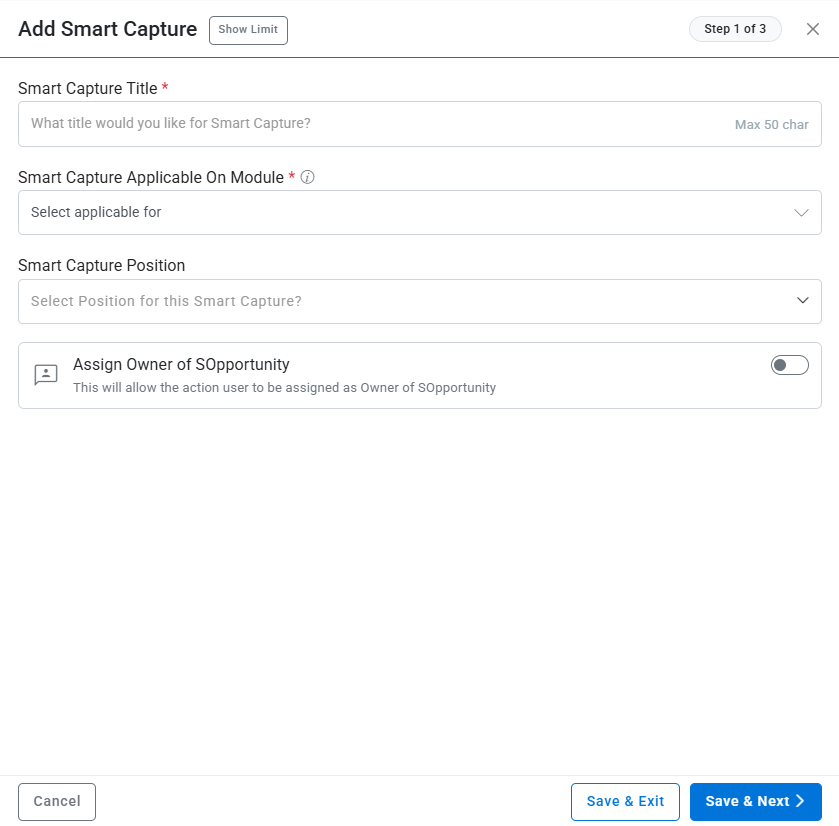
Click the plus (+) icon to add a new Smart Capture. Enter “Change Lead Stage” as the form title, select the Lead Manager module, and choose “Update via Lead Listing” as the form position.
You can build it as per your preference and use-case.
Step 3: Open the Smart Capture Builder
Click Save and Next to create the form and proceed to the form builder interface.
Step 4: Add Required Fields to the Smart Capture
Open the Fields panel. Drag the Lead Stage and Lead Sub Stage fields into the Custom Fields section of the form.
Step 5: Arrange Field Order
Rearrange the fields by dragging them into the desired order: sort the fields as per the requirement.
Step 6: Open Rule Configuration
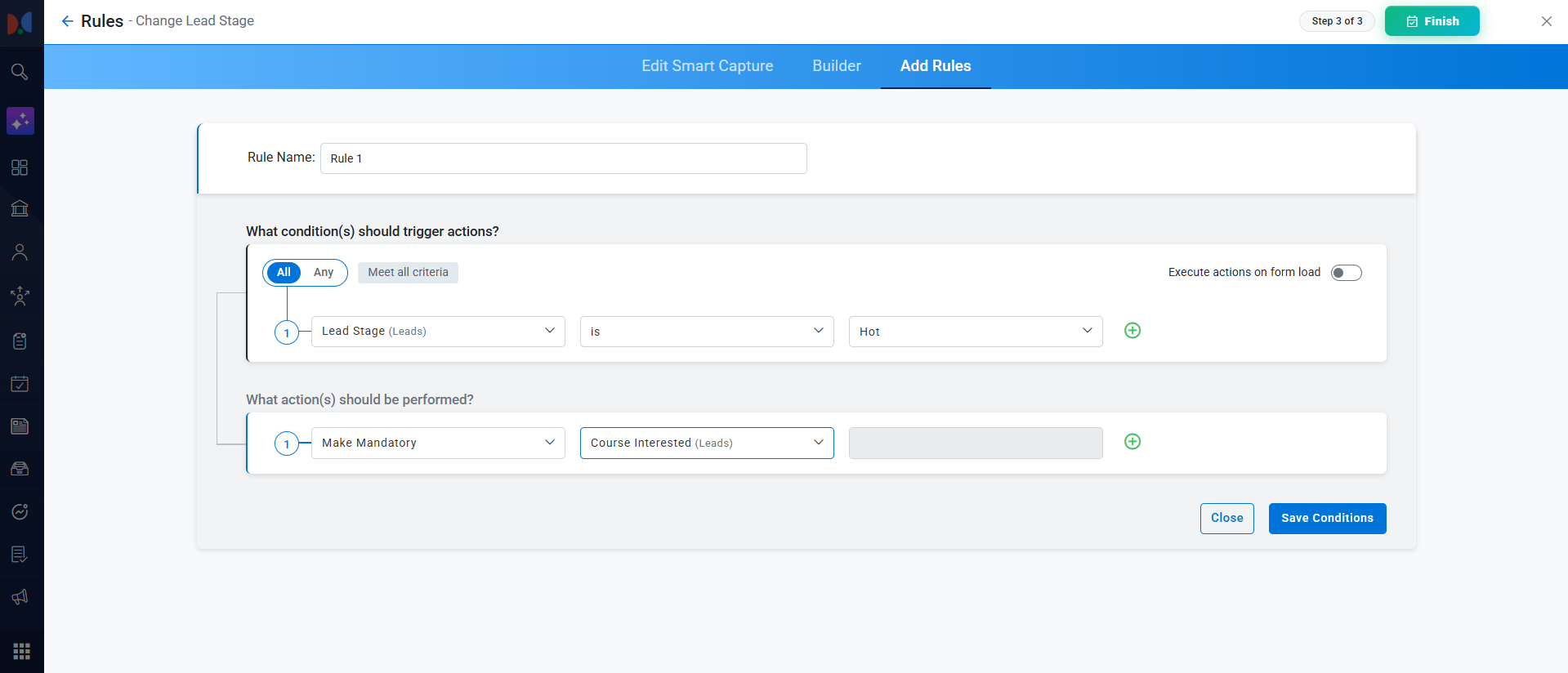
Click Save & Add Rules to save the form layout, then click the Create Rule button to start defining conditional logic for the form.
Step 7: Configure Conditional Rule
Name the rule. Set the condition so that it triggers when “Lead Stage” is “Hot”. For the action, select “Show Field” and choose “Lead Sub Stage” as the field to display when the condition is met.
Step 8: Save the Rule
Click Save Conditions to apply the new conditional logic to your Smart Capture.
Step 9: Click on Finish to create the Smart Capture
Click Finish to create the Smart Capture. Please publish the form by clicking on the more menu in front of the newly created Smart Capture. Post that, enable the Smart Capture to be viewed for users.
Permissions for the Users
Use Cases
Smart Capture adapts to the workflow of any education team. Here are the most common configurations:
- Post-Call Update — EdTech TeamsA counselor completes a student call and needs to update the student's interest, call outcome, opportunity stage, and next follow-up — all in one step.IF (Condition)Call Outcome = InterestedTHEN (Action)Show Course InterestShow Opportunity StageShow Preferred BatchShow Follow-up Date and TimeIF (Condition)Call Outcome = Not InterestedTHEN (Action)Show Reason for DisinterestMake Remarks mandatoryHide Opportunity Stage fields
- Lead Qualification Forms
Different campaigns, courses, or student segments require different qualification questions. Smart Capture adapts based on the course the student has enquired about.IF (Condition)Course = MBATHEN (Action)Show CAT ScoreMake Work Experience mandatoryShow Graduation PercentageIF (Condition)Course = DesignTHEN (Action)Show Portfolio LinkShow Creative BackgroundMake Portfolio Status mandatory - Campus Visit Capture — Coaching CentresA student visits a coaching centre and the counselor needs to capture walk-in details, exam interest, readiness, budget, and parent follow-up.IF (Condition)Interaction Type = Walk-in VisitTHEN (Action)Show Target ExamShow Current Preparation LevelShow Preferred CentreShow Parent Follow-up Required
- Profile Update in Study AbroadA student changes their preferred destination. Different countries require different test scores, visa types, and intake cycles.IF (Condition)Preferred Country changes to CanadaTHEN (Action)Show IELTS/TOEFL Score fieldsHide UCAS fieldsShow Visa StatusUpdate Intake Cycle options to Jan/Sep
- Cross-Sell Logging — Multi-Program InstitutesA student already enrolled shows interest in a second program. The conversation needs to be logged and a new opportunity created — simultaneously.IF (Condition)Existing Enrollment = YesCross-sell Interest = MarkedTHEN (Action)Auto-create new Opportunity for second programLog conversation as Dynamic ActivityShow Program 2 fields only
- Stage-Based Field Visibility — Higher EdDifferent opportunity stages require different information. Showing all fields at all stages creates noise and increases error rates.IF (Condition)Opportunity Stage = Application SubmittedTHEN (Action)Show Document Checklist fieldsMake Entrance Score mandatoryHide Budget and Funding SourceIF (Condition)Opportunity Stage = Offer ReceivedTHEN (Action)Show Fee Payment StatusMake Enrollment Confirmation Date mandatory
Why Is Smart Capture Valuable?
- Protects the flow of work
Counselors and sales teams can update important information at the moment when the context is fresh — right after the interaction, not an hour later when details are already blurring. - Improves data completeness
Relevant fields can be shown or made required based on the situation, helping teams capture what actually matters for each type of interaction rather than leaving fields blank or guessing. - Reduces unnecessary form clutter
Users do not need to see every possible field every time. The form adapts to the scenario — so counselors are not wading through 40 fields to fill in 6 relevant ones. - Keeps the student profile more reliable
When updates are captured properly and completely, the next counselor, manager, or team member who opens that profile can understand the student's journey without having to ask around. - Supports faster team execution
Especially in EdTech and coaching environments, teams can move from one interaction to the next with better structure and less confusion — because the CRM is actually keeping up with them.