Standard Operating Procedure | Subscription Update
s for managing any subscription upgrade/downgrade in the Meritto CRM that includes:
- Existing MOU (CRM Sync as per MOU)
- METs Credit Top-ups
- New Feature/Addon/Limit Update
- Rate Updates – Email/SMS/WABA/PG/Niaa
It outlines the end-to-end process that requires updating subscription details in the Meritto Platform, including invoice generation, approval workflows, payment recognition, and expectations handling.
The objective is to ensure operational clarity, auditability, and compliance alignment for each of these change types. It also defines structured approval workflows, documentation requirements, and coordination responsibilities across Customer Success, Finance, and Operations Excellence (OpEx) teams.
By formalising this SOP, Meritto ensures that every system update is handled consistently, transparently, and with full accountability from initiation to execution.
Note - This SOP ensures that any update done in the system follows one of the following processes with approval metrics (attached below):
- PI/TI and Payment Recognition.
- TI with approval to proceed without payment. (Payment recognition is currently not a part of this process. Tracking of payment recognition will be merged with the payment collection process that is already in place).
- Value Ad/Complementary servicing with approval.
Subscription Update in Meritto CRM
Existing MOU (CRM Sync as per MOU)
- Signed Addendum from the client
- Approval as per Internal Approval Metrics
- Internal Approval
- Approval as per Internal Approval Metrics
METs Credit Top-ups
Applicable For: Communication credits – Email, SMS with DLT, WhatsApp (WABA), Niaa Credits for the following cases
- Paid Top-up – As per MOU:
- Top Up to be done with PI: PI Generated → Payment Recognition as per Internal Approval Metrics → TI Generated → Top Up Done on Meritto CRM.
- Top Up to be done with TI: Approval as per Internal Approval Metrics → TI Generated → Payment Recognition as per Internal Approval Metrics → Top Up Done on Meritto CRM.
- Paid Top-up – Discounted Rate:
- Top Up to be done with PI: Approval as per Internal Approval Metrics → PI Generated → Payment Recognition as per Internal Approval Metrics → TI Generated → Top Up Done on Meritto CRM.
- Top Up to be done with TI: Approval as per Internal Approval Metrics → TI Generated → Payment Recognition as per Internal Approval Metrics → Top Up Done on Meritto CRM.
- Value Added Credits (VAC) & Credit Reversal
- Approval as per Internal Approval Metrics → Top Up Done on Meritto CRM.
Subscription Upgrade/Downgrade – New Feature / Addon / Limit
Applicable For: Client setup changes like paid/complimentary feature enablement/disablement, limit(s) increase/decrease for the following cases.
- Updated Signed MOU (during Renewals):
- MOU to be Renewed with PI: PI Generated → Payment Recognition as per Internal Approval Metrics → TI Generated → Feature Permissions Updated/downgraded on Meritto CRM.
- MOU to be Renewed with TI: Approval as per Internal Approval Metrics → TI Generated → Payment Recognition as per Internal Approval Metrics → Feature Permissions Updated/downgraded on Meritto CRM.
- Paid Feature Add-ons:
- Feature Add-ons with PI: PI Generated → Payment Recognition as per Internal Approval Metrics → TI Generated → Add-ons Updated on Meritto CRM.
- Feature Add-ons with TI: Approval as per Internal Approval Metrics → TI Generated → Payment Recognition as per Internal Approval Metrics → Add-ons Updated on Meritto CRM.
- Complimentary Add-ons:
- Approval as per Internal Approval Metrics → Add-ons Updated on Meritto CRM.
Rate Update – Email / SMS / WABA / PG / Niaa
- Signed Addendum from the client:
- Approval as per Internal Approval Metrics → Rate Updated on Meritto CRM.
- Internal Approval:
- Approval as per Internal Approval Metrics → Rate Updated on Meritto CRM.
Internal Approval Metrics
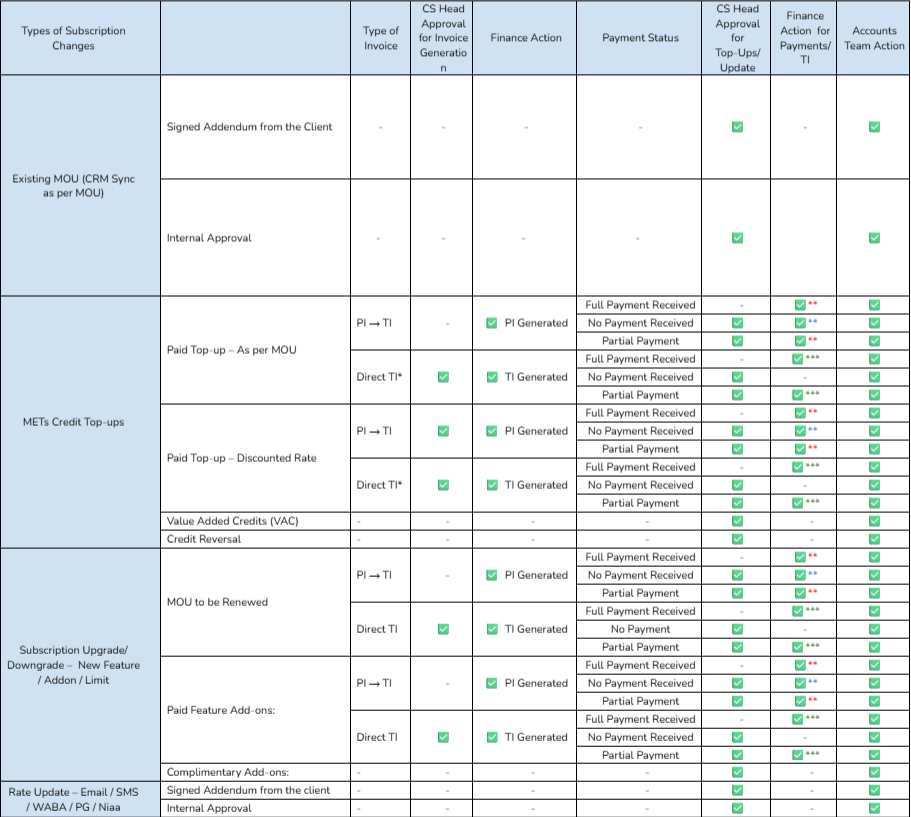
Direct TI*: Based on the list received by Finance, for already known cases of institutes that always require TI, CS head approval will be skipped, and Finance will generate the TI.
** - TI generated by the Finance + Payment verified.
** - No payment received but TI generated(Received full, partial or no payment).
*** - Payment is verified by the Finance (full/partial). TI has already generated. Paid TI given if required.
Execution Flow
The following section outlines the standardised and end-to-end workflow for processing all subscription update requests in the Meritto CRM. The entire process is initiated through the Subscription Update Request Form, which must be submitted by the requester. This ensures structured approval routing, accurate documentation, financial compliance, and timely system updates.
Note: The new process excludes cases of new onboarding and payments collected in installments. Both these cases will be dealt with via the current process only.
Step-by-Step Form Fields and Instructions
Subscription Update Form
Page 1: Subscription Details
- Account ID: Enter the Meritto CRM Account ID of the client.
- Click the
lookup button to auto-populate the Account Name from Meritto CRM.
- Choose the relevant Subscription Update Category and Sub Category:
METs Credit Top-ups: To be chosen in case of Credit Top Ups based on Subcategories:
- Paid Top-up – As per MOU:
- To be selected when the credit top-up aligns with rates defined in the MOU.
- Choose invoice type: PI (Proforma Invoice) or TI (Tax Invoice), as applicable. The request will be processed as per the approval matrix.
- Client confirmation must be uploaded mandatorily.
- Fill the item details: Email, METs, Niaa, SMS (incl. DLT charges), WhatsApp (Marketing/Service/Utility).
- Enter Quantity and MOU rate.
- Cost will auto-calculate as: Quantity × MOU Rate.
- Top-up – Discounted Rate:
- To be selected when top-up is offered at a discounted rate.
- Choose invoice type: PI (Proforma Invoice) or TI (Tax Invoice), as applicable. The request will be processed as per the approval matrix.
- Client confirmation must be uploaded mandatorily.
- Upload Addendum/Capex Doc that confirms the discounted rate.
- Fill the item details: Email, Niaa, METs, SMS (incl. DLT charges), WhatsApp (Marketing/Service/Utility).
- Fill in the item details and enter Quantity, MOU Rate, and Offered Rate.
- Cost will auto-calculate as: Quantity × Offered Rate
- Value Added Credits (VAC) & Credit Reversal:
- Use when offering credits as a value-added service or for credit reversals.
- No invoice will be generated for VAC or Credit reversal. However, the request will be processed as per the approval matrix mentioned above.
- Enter Item Details for which Credits have to be added. Items include: Email, METs, Niaa, SMS(including DLT charges), WhatsApp(Marketing), WhatsApp(Service), WhatsApp(Utility).
- Fill in the Quantity, MOU/Rack Rate.
- The cost will be auto calculated based on the MOU Rate (Quantity*MOU Rate).
- Note: This is a zero-value transaction and is documented only to record free-of-cost credit allocations. Hence, no PI/TI needs to be generated.
- Here are the screenshots of the three cases:
- Rate Updates: To update rates for Email, SMS, Whatsapp, Payment Gateways and NIAA credits:
- Signed Addendum & Internal Approval:
- Applicable when rate changes are supported by a signed addendum or internal approval.
- Upload relevant documents (signed addendum or internal approval.
- No invoice will be generated for VAC or Credit reversal. However, the request will be processed as per the approval matrix mentioned above.
- Rate Changes details need to be added. Items include: Email, SMS, Whatsapp (Utility), Whatsapp (Services), Whatsapp (Marketing), Payment Gateways, and NIAA.
- Fill in the Existing Rate and the New Rate.
- In case of PG, additionally, PG rate type needs to be chosen.
- Here are the screenshots of the cases:
- Subscription Upgrade/Downgrade – New Feature/Addon/Limit: To be chosen in case of:
- Updated Signed MOU:
- Use when a new MOU is signed (e.g., during renewal).
- Choose invoice type: PI (Proforma Invoice) or TI (Tax Invoice), as applicable.
- MOU to be uploaded.
- Paid Feature Add-ons:
- Applicable when additional features are purchased. The request will be processed as per the approval matrix.
- Choose invoice type: PI (Proforma Invoice) or TI (Tax Invoice), as applicable. The request will be processed as per the approval matrix.
- Fill in the Item Details: Feature Add Ons (App User, Application Form, Custom Report, Dedicated IP for Email, Echo, Landing Page, NIAA, Prospecta, Report Builder, Telephony, WABA, Web User, Webhook, Widget, Zing), Feature Limit Add Ons (Automation Limit, Bulk API Hit/5 Sec, Lead Limit, Single API Hit/5 Sec).
- Fill in the Quantity, MOU/Rack Rate and Offered Rate.
- The cost will be auto calculated based on the Offered Rate (Quantity*Offered Rate).
- Note: For Single/Bulk API hits, cost = offered rate directly.
- Note: The item details added in this case are for the feature enablement and not for the rate change of Whatsapp & NIAA. In addition to feature enablement, if rate changes are also applicable, select "Yes" and provide rate details.
- Rate Changes details need to be added. Items include: Email, SMS, Whatsapp (Utility), Whatsapp (Services), Whatsapp (Marketing), Payment Gateways, and NIAA.
- Fill in the Existing Rate and the New Rate.
- In case of PG, additionally, PG rate type needs to be chosen.
- Complimentary Add-ons:
- For free enablement of features.
- No invoice will be generated for Complimentary Add-ons. However, the request will be processed as per the approval matrix.
- Relevant documents need to be uploaded. (non mandatory field).
- Fill in the Item Details: Feature Add Ons (App User, Application Form, Custom Report, Dedicated IP for Email, Echo, Landing Page, NIAA, Prospecta, Report Builder, Telephony, WABA, Web User, Webhook, Widget, Zing), Feature Limit Add Ons (Automation Limit, Bulk API Hit/5 Sec, Lead Limit, Single API Hit/5 Sec).
- Fill in the Quantity, MOU/Rack Rate, and Offered Rate.
- The cost will be auto calculated based on the Offered Rate (Quantity*Offered Rate).
- Note: For Single/Bulk API hits, cost = offered rate directly.
- Note: The item details added in this case are for the feature enablement and not for the rate change of Whatsapp & NIAA. In addition to feature enablement, if rate changes are also applicable, select "Yes" and provide rate details.
- Note: This is a zero-value transaction and is documented only to record free-of-cost credit allocations. Hence, no PI/TI needs to be generated.
- Rate Changes details need to be added. Items include: Email, SMS, Whatsapp (Utility), Whatsapp (Services), Whatsapp (Marketing), Payment Gateways, and NIAA.
- Fill in the Existing Rate and the New Rate.
- In case of PG, additionally, PG rate type needs to be chosen.
- Here are the screenshots of the cases:
Page 2: Payment Details
- Click "Yes" if the client has any pending dues.
- Fill in the following:
- Oldest Pending Invoice Date
- Expected Date of Payment
- Total Outstanding Amount
- Note: If the pending invoice is older than 15 days, CS Head approval will be triggered.
- For VAC and Credit Reversal, enter a valid justification in the remarks section.
Page 3: Requestor Information
Review the auto-filled fields and edit if incorrect:
- Requester Name
- Email ID
- Manager’s Email
- Head of Department’s Email
Post Submission Notifications
- Upon form submission, the CS SPOC will receive an automated email with a unique Submission ID.
- An email notification is sent to the CS Head for approval based on the selected sub-category.
- Upon CS Head’s approval:
- The finance team will review and upload the PI/TI as per request.
- The finance team will review and upload the PI/TI as per request.
- Once completed, CS SPOC will receive:
- The invoice via email
- A link to the Payment Confirmation Form
- Finance team to note: It is mandatory for the Finance team to enter the Invoice Number and attach the PI/TI file before marking the request as approved.
Payment Confirmation Form
Once the CS SPOC receives the payment or wants to get the top up done without the payment received, the payment confirmation form needs to be filled.
Page 1: Requestor Information
- Auto-filled based on the original submission.
- Subscription Update ID
- Requester Name
- Requester Email ID
- Requester's Manager Email ID
- Requester's Head Email ID
Page 2: Subscription Update Details
- Auto-filled with the following:
- Account ID
- Account Name
- Subscription Update Type
- Subscription Update Sub Type
- Invoice Type
- Invoice Number
- Total cost mentioned in subscription update form
Page 3: Payment Details
- CS SPOC must confirm whether payment has been received. Required fields:
- Payment Date
- TDS Deducted [if any] (Add in percentage. E.g: For 2% TDS deduction, add 2 in the field).
- Payment Amount Received (In Bank) (Pre-filled)
- UTR No/Reference No./Description
- Total Payment Amount as per PI/TI
- Promise to Pay Date
- Is there any existing outstanding amount for the account?
- Outstanding Amount: Enter the outstanding amount till the date for the account
- Date of the oldest Invoice Date
Post Submission Notifications
After submission of the payment confirmation form:
- The request will flow through the final approval chain.
- Once it reaches the Operations Excellence Team, the relevant top-up or configuration change will be executed in Meritto CRM.
- A confirmation email will be sent to the CS SPOC upon successful update.
Team-wise Roles & Responsibilities
CS SPOC
- The CS SPOC is responsible for the following tasks related to the subscription update process:
- Correct data entry in the subscription update form.
- Relevant attachments (documents/images) wherever necessary.
- Payment collection as per the given timeline by them.
- Keep a track of the entire loop of approvals and ensure the request is getting executed in a timely manner.
CS Head
- The CS Head is responsible for the following tasks related to the subscription update process:
- Approve or Deny the request with proper comments added in the approval window.
- In cases where the approval is required by the HOD (in cases where the offered rate is lower than the threshold), route it to them via email. Ensure that the Finance team is also notified in such cases (can be looped under the same email).
Finance Team
- The Finance Team is responsible for the following tasks related to the subscription update process:
- Provide the PI/TI/PTI as requested after verifying the details, approvals from the CS Head/HOD, and past financial records of the client.
- Approve or Deny the request with proper comments added in the approval window.
- Verify the payment details in case of full & partial payment and generate TI/Paid TI as requested. Also, generate TI without payment if requested and duly approved by the CS Heads.
Operations Excellence Team
- The Operations Excellence Team is responsible for the following tasks related to the subscription update process:
- Verify the details and as per request, execute the credit top-ups or rate changes on Meritto CRM.
- In case of MOU Update, verify each detail and update the CRM of the client as per the updated MOU. This will include limits, feature upgrades and downgrades as per MOU, addition/deletion of users etc.
- Once executed, Approve or Deny the request with proper comments added in the approval window.
- Note: For any type of upselling, downselling done by the CS SPOC, the request will be parked to the Operations Excellence Team for enablement on Meritto CRM.
Related Articles
Dynamic Activity Update Trigger in Webhook
Overview The Dynamic Activity Update Trigger is a webhook trigger that activates whenever an existing dynamic activity is updated under the Lead or Opportunity module. This includes updates done through the API, directly from the Lead/Opportunity ...Update || Change in Delivery Timings for SMS Service Explicit Messages
Overview As per the latest regulatory directive from TRAI (Telecom Regulatory Authority of India), all Service Explicit (SE) messages must now be delivered strictly within the permissible time window of 10:00 AM to 9:00 PM Effective from 30th October ...All About Renewal Process
Introduction If a client is renewing the new session where data purge and a new session update are required, then we termed it as a renewal and it is an every-year process. The process starts once the MOU is signed by the client. Note: If the MOU is ...Webform (Widget) Limits & Restrictions
Overview This article outlines the limits and restrictions associated with creating webform widgets in Meritto. Understanding these limitations is crucial for managing your lead-capture strategy effectively and ensuring the optimal performance of ...Lead Fields Limit in Meritto CRM
Overview This article outlines the limits for creating and managing custom fields within Meritto’s Lead Fields module. Understanding these limitations is crucial for efficiently utilizing your allocated resources and ensuring the optimal performance ...