Configuring the Registration Form for the User Signup/Registration & Student Profile
Overview
This article serves as a guide for configuring which data fields appear on your user signup or registration form using the Lead Fields module. By specifically controlling field visibility, you ensure you collect only the necessary information, which contributes to faster page load times and a smoother user experience.
Permissions Needed
Module | Permission Name | Description |
Lead Fields | Settings > View Lead Fields | Allows you to view the list of all system and custom fields. |
Lead Fields | Settings > Add/Edit Lead Fields | Grants permission to create new custom fields and edit existing ones. |
Navigation & Access
You can access the Lead Fields module where these configurations are made using two methods:
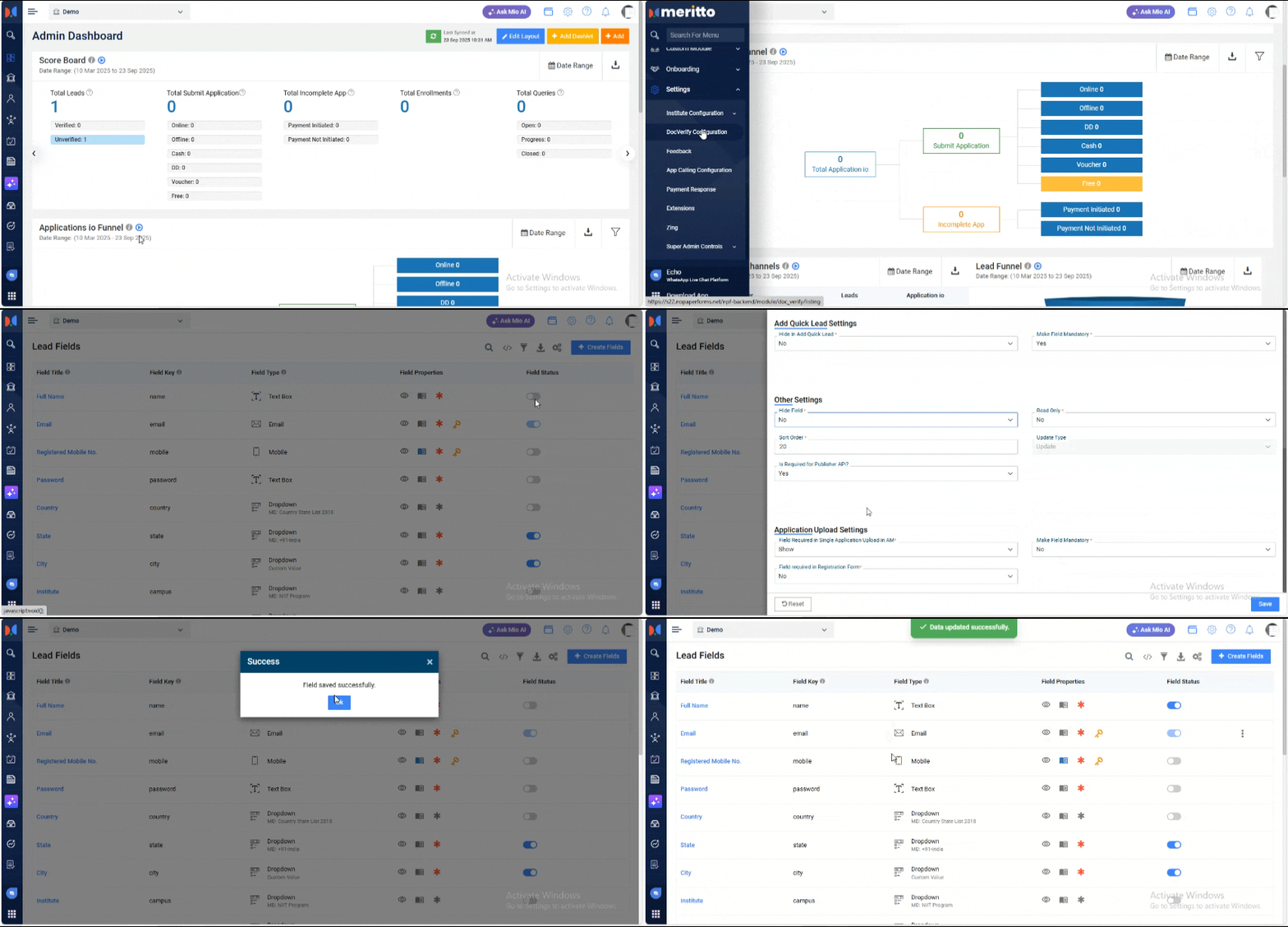
- From the navigation menu, go to Settings > Institute Configuration > Lead Fields.
- Alternatively, use the search bar to directly search for "Lead Fields".
Configuration Options: Field Visibility on Registration Form
The system uses a combination of settings to determine if a field is visible on the user registration form. This enhanced configuration, using the "Field Required in Registration Form" option, optimizes form loading speed.
- Access Field Configuration: On the Lead Fields page, hover over the right side of the field you want to edit and click the vertical three dots icon (⋮) and select Edit.
Alternatively, you can click on the field title to open its configuration. - Locate Settings: In the field configuration screen, locate the Application Upload Settings section.
- Ensure Field is Not Hidden: Ensure that the Hide Field option is set to No.
- Activate Registration Visibility: Change the Field Required in Registration Form option to Yes. (By default, this option is set to "No.")
- Enable Field Status: Check the main Lead Fields page in the Field Status column and ensure the toggle for the field is Enabled (ON) to fully activate the field in the system.
Expected Outcome: The field will now be visible to users on the Registration Form & Student Profile into Student Admission Portal (SAP).
Business Relevance
Controlling field visibility directly impacts your enrollment strategy and efficiency. By using the "Field Required in Registration Form" setting, you achieve the following:
- Accelerated Engagement: By providing immediate login credentials, you enable the student to access their Student Applicant Dashboard instantly which is a user's primary hub, allowing them to easily view their profile, track application status, and interact with multiple necessary forms (e.g., application forms, fee payment forms) without needing to re-enter information or navigate away from the system.
- Better Data Quality: You ensure every new lead provides the most important information right away. This gives counselors accurate, reliable data for immediate follow-up.
- Optimized Performance: The system handles field visibility efficiently, which prevents slow page loading on your registration forms, even during busy enrollment periods.
Conclusion
By configuring field visibility using the enhanced "Field Required in Registration Form" option, you gain precise control over your signup form. This not only allows you to dictate exactly what data is collected but also helps improve your form's performance and delivers a smoother experience for prospective students.